


Fambase: Live & Group Chat
4.3415.00 Reviews
App Specs
- Version
- 6.8.3
- Updated On
- License
- Free
- Downloads
- 1,000,000+
- Developer
- Nextwave Media Holdings Limited
- Categories
- Lifestyle
- Platform
- Android, iOS
Screenshots
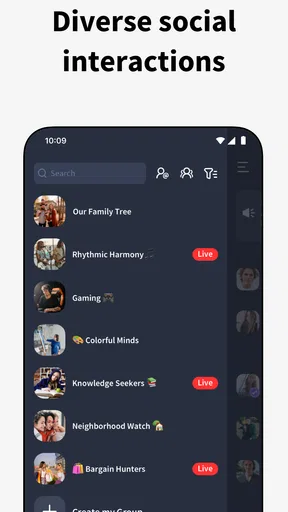


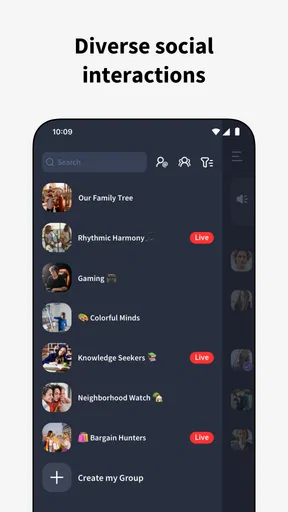


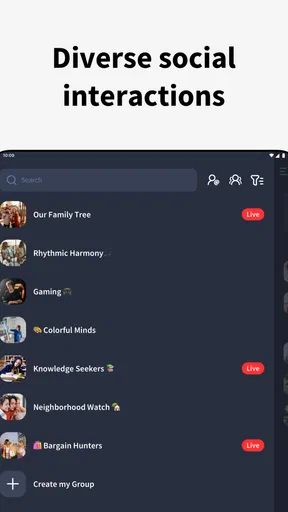

 Analysis by AppCompare
I find group chat works best when everyone has a reason to return to the same conversation, rather than when it becomes another stream of messages to keep up with. That is the useful idea behind Fambase: Live & Group Chat: it brings a private community and live interaction into one place. The appeal is less about replacing every messenger on your phone and more about giving a particular circle a shared room where conversations can feel immediate and ongoing.
A shared room changes the rhythm
In an ordinary one-to-one messenger, the conversation tends to move between individual threads. A group chat gathers people together, but it can still feel like a busy inbox: someone asks a question, replies arrive at different times, and useful details get buried. Fambase’s emphasis on live community interaction offers another rhythm. When people are available together, a discussion can unfold in the moment rather than as a chain of delayed replies.
That distinction matters most for groups that benefit from participation, not just announcements. Friends planning a weekend, a family coordinating a get-together, or a circle with a shared hobby can use the group as a place to talk through choices while everyone is present. I would still keep time-sensitive essentials clear and easy to find elsewhere if the group’s chat becomes busy; the spontaneous feel is a strength, but it can also make a conversation harder to scan later.
What “private community” means in everyday use
The app is a lifestyle product from Nextwave Media Holdings Limited, and its central purpose is communication among people who want a shared space. That makes it different in emphasis from a broad social feed, where posts may be aimed at an audience of strangers, and from a basic SMS thread, which is usually best for quick coordination with people already in your contacts. Here, the idea is to bring a group’s ongoing conversation and live exchanges together.
For a practical routine, I would start by deciding what the group is for before inviting everyone. A family space might be for plans and check-ins; a hobby group might focus on sharing reactions and arranging a regular meetup. That small bit of agreement helps prevent the usual problem of a group chat becoming a catch-all for unrelated messages. It also makes it easier for quieter members to know when they have something useful to add.
Who will appreciate the live focus
Fambase makes the most sense if you already have a small or medium-sized circle that wants to be available to one another, rather than a crowd that only needs occasional notices. Voice messages can help when typing is awkward: for example, someone walking home can send a quick spoken update, while another person can listen when convenient. They add warmth and tone, though they are not a perfect substitute for a written detail such as an address or a list of times.
If your group includes different schedules, treat live chat as an invitation rather than an expectation. People should be able to join a conversation when it suits them, without feeling that they must watch the app constantly. A useful habit is to put the decision or next step in a short text after a lively discussion. That gives members who missed the live moment something concrete to catch up on and reduces the chance that an important plan disappears into the flow.
Worth Reading Before You Choose

EA SPORTS FC Mobile 26 Is a Bigger Football Game, but It Takes Time

Flipboard Shows What News Apps Must Do Beyond the Feed

Switching to Android Auto Means Rethinking Your Driving Routine

Google Calendar Makes a Crowded Week Easier to Manage

Ludo King Makes the Most of the Minutes Between Plans

Baby Panda World Brings Quick Play to Modern Phones, but Its Game Library Feels Busy
Practical limits and sensible expectations
A dedicated community app only becomes useful when the people you want to talk with are willing to use it too. If your friends and relatives are already settled in another messenger, asking them to install a separate app may create friction. I would try it with one group that has a clear reason to gather there, rather than moving every conversation at once. For brief logistics with people who prefer not to add another service, the messenger they already use may be the more considerate choice.
It is also worth being realistic about what a live-first group can and cannot do. A lively room can make a community feel closer, but it can also create more interruptions than a simple message thread. Muting or notification controls, where available, are worth checking early so that a chat does not take over your day. Likewise, do not assume that a group space is automatically appropriate for sensitive discussions just because it feels private. Review the app’s current privacy controls and decide what information you are comfortable sharing.
Costs, age suitability, and choosing thoughtfully
The app is free to download, with optional in-app purchases listed from $4.99 to $249.99 per item. That wide range is a good reason to look at any purchase details inside the app before paying, and to make sure younger users have appropriate guidance around spending. Its Mature 17+ content rating also makes it a poor default choice for children; families should consider age suitability rather than treating the word “family” in a group’s purpose as a signal that the app is designed for all ages.
On Android, it supports devices running version 6.0 or later, and the current version is 6.7.3. It has been available since September 22, 2021, and its audience has grown to more than 1 million installs. A 4.1 average from around 2,600 ratings, alongside 403 written reviews, suggests a generally positive reception without making the app a guaranteed fit for every group. I would use those figures as context, then judge it by whether the people you want to bring together actually enjoy using it.
Getting Started with Fambase
First things first, downloading Fambase is straightforward. Whether you’re on Android or iOS, the app is readily available and easy to install. Once you’ve got it on your device, you’re greeted with a clean and intuitive interface. The design is sleek but not overly complicated—perfect for both tech wizards and the not-so-techy among us. The registration process is quick, and before you know it, you’re ready to dive into a world of live chat and group fun.
Features that Stand Out
Alright, so what does Fambase offer that’s got me so hyped? For starters, the live chat feature is a game-changer. Imagine being able to talk to your friends, family, or even new acquaintances in real-time. It’s like bringing the spontaneity of a real-life conversation into the digital realm.
A feature I particularly love is the Group Chat functionality. You can create groups based on your interests, from book clubs to gaming squads, and engage in lively discussions. The app supports voice messages, which adds a personal touch to your chats. It's like having a walkie-talkie in your pocket!
Easy Navigation and Customization
What’s an app without some good navigation, right? Fambase nails this with its user-friendly layout. You can easily switch between live chats and group conversations without any hassle. For those who love personalization, the app offers customization options to tweak your profile and chat settings to your liking. Whether it’s changing your display picture or setting a fun status, Fambase lets you express yourself effortlessly.
Privacy and Security
In today’s digital age, privacy is paramount, and Fambase doesn’t disappoint. The app employs robust security measures to ensure your data is safe. End-to-end encryption means your conversations stay private, and you can chat away without a second thought. Plus, there are options to manage who can see your profile and interact with you, giving you peace of mind.
Why Fambase Stands Out
You might be wondering, “What makes Fambase different from the myriad of chat apps out there?” For me, it’s the combination of real-time interaction with the sense of community. It’s not just about messaging; it’s about building connections. The app’s design encourages spontaneity and fun while keeping things secure and easy to use.
Another aspect is the vibrant community. Whether you’re looking to make new friends or just want to keep in touch with your current circle, Fambase provides the perfect platform. The app’s ability to adapt to various communication styles makes it versatile and inclusive.
The Final Word
Wrapping it all up, Fambase: Live & Group Chat is more than just another chat app. It’s a tool for building and maintaining relationships in a fast-paced world. With its intuitive interface, engaging features, and strong emphasis on privacy, it ticks all the right boxes. Whether you’re a social butterfly or someone who just wants to stay connected, Fambase has something for you.
So, what are you waiting for? Dive into Fambase and experience the future of communication today!
Pros
- Easy-to-use interface for all users.
- Seamless integration with social media.
- High-quality video and audio calls.
- Customizable chat themes and emojis.
- Excellent privacy and security features.
Cons
- Occasional connectivity issues.
- Limited features in free version.
- Consumes significant battery life.
- Group call participant limit.
- Some features require in-app purchases.
FAQs for Fambase: Live & Group Chat
What is Fambase: Live & Group Chat, and how does it work?
Fambase: Live & Group Chat is a social networking app designed to bring people together through live video chats and group conversations. Users can join various chat rooms or create their own, allowing for real-time communication with friends or new connections. The app supports both private and public chats, making it versatile for different social needs.
Is Fambase: Live & Group Chat safe to use?
Yes, Fambase implements several safety measures to protect its users. These include privacy settings that allow users to control who can join their chats and report features for inappropriate behavior. The app also has moderation tools to ensure a safe environment, but users are encouraged to remain cautious and aware while interacting online.
Are there any costs associated with using Fambase: Live & Group Chat?
Fambase: Live & Group Chat is free to download and use. However, it may offer in-app purchases or premium features for enhanced experiences, such as unique chat themes or additional privacy options. These are optional, and the core functionalities of the app remain accessible without any charges.
Can I use Fambase: Live & Group Chat on multiple devices?
Yes, Fambase can be used on multiple devices. Users can log in to their account on different devices without losing their chat history or contacts. The app syncs across devices, ensuring a seamless experience whether on a smartphone or tablet. However, simultaneous logins are typically limited to maintain security.
What kind of customization options does Fambase offer?
Fambase provides several customization options to personalize your experience. Users can choose from a variety of avatars and themes to tailor the look of their profiles and chat interfaces. Additionally, chat rooms can be customized with unique names and privacy settings, allowing users to create spaces that fit their specific social needs.


